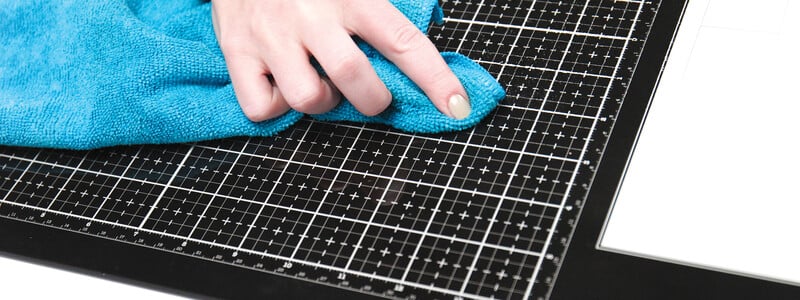
Clearly, this mat is amazing, and we want to share everything you need to know about cleaning and caring for your Clearly Amazing Mat from Scrapbook.com!
Have you ever wanted to create a gorgeous, memorable mini album but didn't know where to start? We have 10 amazing video tutorials to inspire and instruct you on building a beautiful album from start to finish.
Do your craft supplies need an organization overhaul? Then start with this ultimate guide to top-rated, customer favorite storage and organization solutions.
Join us as we share all about the latest deals, products, and events happening at Scrapbook.com! Join us LIVE as we celebrate NSD Week! We'll be crafting, chatting, and letting you know how we're celebrating the week! Chat with us LIVE onTuesday,...
Click on the teacher's name to be taken directly to their class: Carissa Wiley Adrienne Boese Obed Marshall Angelica Conrad Laura Graff Click on the teacher's name to be taken directly to their class: Ralph Tyndall Natasha Polite Nicki...
Check your list and check it twice - Scrapbook.com's 2023 Holiday Gift Guide has everything you need to check this season's top crafty tools and supplies off everyone's Christmas lists (including your own!).
World Card Making Day is back (October 7th!) - and we've hand-selected some of the best cards created in 2023 to showcase. See what other card makers have created and get inspired!
Welcome to Creative Kindness Week 2023! Creative Kindness® Foundation is a non-profit organization founded by Scrapbook.com. Creative Kindness® works with a variety of organizations through our programs. For Creative Kindness Week 2023, we are...
These Scrapbook.com Exclusive crafting mats will change the way you craft! From die-cutting to ink blending these mats will make a world of difference. Each mat is unique in its own way and we are here to tell you how!
What is an SVG File? SVG is an acronym for Scalable Vector Graphic. This type of vector file is compatible with most cutting machines because it contains specific information about the direction of the cuts and can communicate that information to...
Glitter, gloss, or pearl? Pink, blue, or green? Browse the full range of the Scrapbook.com Pops of Color Collection to add eye-catching accents to every project!
Clearly, this mat is amazing, and we want to share everything you need to know about cleaning and caring for your Clearly Amazing Mat from Scrapbook.com!
On this episode of the Life Handmade Podcast, we are joined by Marie Heiderscheit, of Marie Nicole Designs! Marie shares how finding a creative outlet helped her through a grieving process and find the beauty in life!