Take an Extra 15% OFF With Code: CELEBRATE
Shop All Scrapbooking Cardmaking Inspiration Watch SBC Fest Creative Kindness More


Does this happen often with die cutting machines?

  • GlitterCat Studios
    I found a relatively-inexpensive one from Amazon that I received today. I had already purchased dies from Amazon that I wanted to use in my Victorian cards.

    First, the published instructions for dies didn't work (plate combinations), so I had to shuffle around plates in order to get them to fit.

    When they finally did fit, some portions of the dies didn't cut all the way through the paper (AND my plates are now cut), so I had to waste an hour trying to cut them fully with my X-acto knife.

    Is this common? Or am I missing something here?

    Thanks.
  • GMFTS
    It sounds like you may still not have the plates right. You might check YouTube to see if there are any videos pertaining to your particular machine.
  • GlitterCat Studios
    Well, like I said, it's been trial-and-error in even getting them to do the dies they did include, since the instructions were obviously wrong.

    So then what you're saying is that this really isn't a common thing for the dies to not cut the paper evenly?
  • GlitterCat Studios
    Well, I did go to YouTube and began learning more about what they call intricate dies. It turns out that because of their design, and the design of the roller not having enough applied force in the middle, that most everyone has trouble cutting these very delicate designs. One account even went so far as to demonstrate that smooth paper isn't as successful at cutting intricate designs as paper with some tooth to it. As soon as I heard more about how to handle it from several accounts, and I applied those techniques, I didn't have to change one set-up or configuration with the plates--they cut BEAUTIFULLY!

    Thanks again! VERY happy die-cutter here. blush emoji
  • GMFTS
    I'm glad you got resolution. Happy cutting.
  • GlitterCat Studios
    [gallery=7222019]

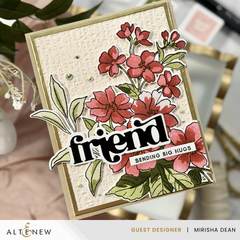
    Here's the finished card! Thanks again for all your help.
  • GlitterCat Studios
    Hi,

    I got your message on the card, but for some reason, this company doesn't give us the ability to directly respond to comments.

    Firstly, THANK-YOU!!!!!

    I actually went into PaintShop Pro (my ancient 5.03 raster programme) and designed and printed that out. I don't spend much on rubber stamps since technology is readily available, and I didn't want to stamp the inside. Since I did this in Anna Griffin's card style, I noticed that she will sometimes have a printed insert that's beautiful, but very simplistic, so that's what I went for. I eyeballed the colours enough that they matched the rest of the scrapbook papers I used for the card front.

    Thanks again for the encouragement! heart_decoration emoji